iPOPO in 10 minutes
This tutorial presents how to use the iPOPO framework and its associated service-oriented component model. The concepts of the service-oriented component model are introduced, followed by a simple example that demonstrates the features of iPOPO. This framework uses decorators to describe components.
Note
This tutorial has been updated to use types instead of named specifications.
Introduction
iPOPO aims to simplify service-oriented programming on OSGi frameworks in Python language; the name iPOPO is an abbreviation for injected POPO, where POPO would stand for Plain Old Python Object. The name is in fact a simple modification of the Apache iPOJO project, which stands for injected Plain Old Java Object
iPOPO provides a new way to develop OSGi/iPOJO-like service components in Python, simplifying service component implementation by transparently managing the dynamics of the environment as well as other non-functional requirements. The iPOPO framework allows developers to more clearly separate functional code (i.e. POPOs) from the non-functional code (i.e. dependency management, service provision, configuration, etc.). At run time, iPOPO combines the functional and non-functional aspects. To achieve this, iPOPO provides a simple and extensible service component model based on POPOs.
Since iPOPO v3, we recommend using types as much as possible to avoid issues when developing large software with the framework.
Basic concepts
iPOPO is separated into two parts:
Pelix, the underlying bundle and service registry
iPOPO, the service-oriented component framework
It also defines three major concepts:
A bundle is a single Python module, i.e. a
.pyfile, that is loaded using the Pelix API.A service is a Python object that is registered to the service registry using the Pelix API, associated to a set of specifications and to a dictionary of properties.
A component is an instance of component factory, i.e. a class manipulated by iPOPO decorators. Those decorators injects information into the class that are later used by iPOPO to manage the components. Components are defined inside bundles.
Simple example
In this tutorial we will present how to:
Publish a service
Require a service
Use lifecycle callbacks to activate and deactivate components
Presentation of the Spell application
To illustrate some of iPOPO features, we will implement a very simple application. Three bundles compose this application:
A bundle that defines a component implementing a dictionary service (an English and a French dictionaries).
One with a component requiring the dictionary service and providing a spell checker service.
One that defines a component requiring the spell checker and providing a user line interface.
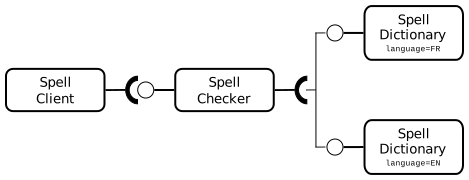
The spell dictionary components provide the spell_dictionary_service
specification. The spell checker provides a spell_checker_service
specification.
Preparing the tutorial
The example contains several bundles:
spell_checker_api.pydefines the Python protocols that describe the different services in use.spell_dictionary_EN.pydefines a component that implements the Dictionary service, containing some English words.spell_dictionary_FR.pydefines a component that implements the Dictionary service, containing some French words.spell_checker.pycontains an implementation of a Spell Checker. The spell checker requires a dictionary service and checks if an input passage is correct, according to the words contained in the wished dictionary.spell_client.pyprovides commands for the Pelix shell service. This component uses a spell checker service. The user can interact with the spell checker with this command line interface.
Finally, a main_pelix_launcher.py script starts the Pelix framework. It is not considered as a bundle as it is not loaded by the framework, but it can control the latter.
Defining specifications
Note
This section is new in iPOPO v3
Instead of relying exclusively on specification names to link components together, it is now recommended to declare protocols or classes and to use those to declare injected fields.
For example, the spell_checker_api bundle contains only the definition of
the specifications we will use in this project.
It is recommended to use a specific file to define specifications and constants
in order to share it between the provider and consumer bundles.
 1#!/usr/bin/python
 2# -- Content-Encoding: UTF-8 --
 3"""
 4Module defining the types used in the Spell Checker
 5"""
 6
 7from typing import Protocol
 8
 9from pelix.constants import Specification
10
11
12# Set the name of the specification
13@Specification("spell_dictionary_service")
14class SpellDictionary(Protocol):
15    """
16    Definition of the spell dictionary service
17    """
18
19    def check_word(self, word: str) -> bool:
20        """
21        Determines if the given word is contained in the dictionary.
22
23        @param word the word to be checked.
24        @return True if the word is in the dictionary, False otherwise.
25        """
26        ...
27
28
29@Specification("spell_checker_service")
30class SpellChecker(Protocol):
31    """
32    Definition of the spell checker service
33    """
34
35    def check(self, passage: str, language: str = "EN") -> list[str] | None:
36        """
37        Checks the given passage for misspelled words.
38
39        :param passage: the passage to spell check.
40        :param language: language of the spell dictionary to use
41        :return: An array of misspelled words or null if no words are misspelled
42        :raise KeyError: No dictionary for this language
43        """
44        ...
The
@Specificationdecorator will store in the protocol/class the name of the specification. This is highly recommended as it will be the name used in the Pelix service registry and when communicating with remote framework if you want to use remote services. See Specifications for the details of the decorator, and why the name should be given explicitly.We recommend using the Python
Protocolas parent of each specification class as it is meant to declare a type.
Once the specifications are defined, we can continue by implementing them with different components.
Note
Depending on your own code style, you can either repeat the explicit types on the methods implementing a specification, or let them be inherited from the protocol.
Also note that the specification module must be importable by the bundles, but doesn’t need to be installed as a bundle itself.
The English dictionary bundle: Providing a service
The spell_dictionary_EN bundle is a simple implementation of the
Dictionary service. It contains few English words.
 1#!/usr/bin/python
 2# -- Content-Encoding: UTF-8 --
 3"""
 4This bundle provides a component that is a simple implementation of the
 5Dictionary service. It contains some English words.
 6"""
 7
 8from spell_checker_api import SpellDictionary
 9
10from pelix.framework import BundleContext
11from pelix.ipopo.decorators import ComponentFactory, Instantiate, Invalidate, Property, Provides, Validate
12
13
14# Name the iPOPO component factory
15@ComponentFactory("spell_dictionary_en_factory")
16# This component provides a dictionary service
17@Provides(SpellDictionary)
18# It is the English dictionary
19@Property("_language", "language", "EN")
20# Automatically instantiate a component when this factory is loaded
21@Instantiate("spell_dictionary_en_instance")
22class EnglishSpellDictionary(SpellDictionary):
23    """
24    Implementation of a spell dictionary, for English language.
25    """
26
27    def __init__(self) -> None:
28        """
29        Declares members, to respect PEP-8.
30        """
31        self.dictionary: set[str] = set()
32
33    @Validate
34    def validate(self, context: BundleContext) -> None:
35        """
36        The component is validated. This method is called right before the
37        provided service is registered to the framework.
38        """
39        # All setup should be done here
40        self.dictionary = {"hello", "world", "welcome", "to", "the", "ipopo", "tutorial"}
41        print("An English dictionary has been added")
42
43    @Invalidate
44    def invalidate(self, context: BundleContext) -> None:
45        """
46        The component has been invalidated. This method is called right after
47        the provided service has been removed from the framework.
48        """
49        self.dictionary = set()
50
51    # No need to have explicit types: annotations are inherited
52    def check_word(self, word):
53        word = word.lower().strip()
54        return not word or word in self.dictionary
The
@Componentdecorator is used to declare an iPOPO component. It must always be on top of other decorators.The
@Providesdecorator indicates that the component provides a service. We also indicate the type of service we provide, either using the type directly (recommended) or its specification name.The
@Instantiatedecorator instructs iPOPO to automatically create an instance of our component. The relation between components and instances is the same than between classes and objects in the object-oriented programming.The
@Propertydecorator indicates the properties associated to this component and to its services (e.g. French or English language).The method decorated with
@Validatewill be called when the instance becomes valid.The method decorated with
@Invalidatewill be called when the instance becomes invalid (e.g. when one its dependencies goes away) or is stopped.
For more information about decorators, see iPOPO Decorators.
In order for IDEs and type checking tools like MyPy to help you developing components, you should indicate that the component class inherits from the specification protocols it provides.
The French dictionary bundle: Providing a service
The spell_dictionary_FR bundle is a similar to the
spell_dictionary_EN one. It only differs in the language component
property, as it checks some French words declared during component
validation.
 1#!/usr/bin/python
 2# -- Content-Encoding: UTF-8 --
 3"""
 4This bundle provides a component that is a simple implementation of the
 5Dictionary service. It contains some French words.
 6"""
 7
 8from spell_checker_api import SpellDictionary
 9
10from pelix.framework import BundleContext
11from pelix.ipopo.decorators import ComponentFactory, Instantiate, Invalidate, Property, Provides, Validate
12
13
14# Name the iPOPO component factory
15@ComponentFactory("spell_dictionary_fr_factory")
16# This component provides a dictionary service
17@Provides(SpellDictionary)
18# It is the French dictionary
19@Property("_language", "language", "FR")
20# Automatically instantiate a component when this factory is loaded
21@Instantiate("spell_dictionary_fr_instance")
22class FrenchSpellDictionary(SpellDictionary):
23    """
24    Implementation of a spell dictionary, for French language.
25    """
26
27    def __init__(self) -> None:
28        """
29        Declares members, to respect PEP-8.
30        """
31        self.dictionary: set[str] = set()
32
33    @Validate
34    def validate(self, context: BundleContext) -> None:
35        """
36        The component is validated. This method is called right before the
37        provided service is registered to the framework.
38        """
39        # All setup should be done here
40        self.dictionary = {"bonjour", "le", "monde", "au", "a", "ipopo", "tutoriel"}
41        print("A French dictionary has been added")
42
43    @Invalidate
44    def invalidate(self, context: BundleContext) -> None:
45        """
46        The component has been invalidated. This method is called right after
47        the provided service has been removed from the framework.
48        """
49        self.dictionary = set()
50
51    # No need to have explicit types: annotations are inherited
52    def check_word(self, word):
53        word = word.lower().strip()
54        return not word or word in self.dictionary
It is important to note that the iPOPO factory name must be unique in a framework: only the first one to be registered with a given name will be taken into account. The name of component instances follows the same rule.
The spell checker bundle: Requiring a service
The spell_checker bundle aims to provide a spell checker service.
However, to serve this service, this implementation requires a
dictionary service. During this step, we will create an iPOPO component
requiring a Dictionary service and providing the Spell Checker service.
  1#!/usr/bin/python
  2# -- Content-Encoding: UTF-8 --
  3"""
  4The spell_checker component uses the dictionary services to check the spell of
  5a given text.
  6"""
  7
  8import re
  9
 10from spell_checker_api import SpellChecker, SpellDictionary
 11
 12from pelix.framework import BundleContext
 13from pelix.internals.registry import ServiceReference
 14from pelix.ipopo.decorators import (
 15    BindField,
 16    ComponentFactory,
 17    Instantiate,
 18    Invalidate,
 19    Provides,
 20    Requires,
 21    UnbindField,
 22    Validate,
 23)
 24
 25
 26# Name the component factory
 27@ComponentFactory("spell_checker_factory")
 28# Provide a Spell Checker service
 29@Provides(SpellChecker)
 30# Consume all Spell Dictionary services available (aggregate them)
 31@Requires("_spell_dictionaries", SpellDictionary, aggregate=True)
 32# Automatic instantiation
 33@Instantiate("spell_checker_instance")
 34class SpellCheckerImpl:
 35    """
 36    A component that uses spell dictionary services to check the spelling of
 37    given texts.
 38    """
 39
 40    # We can declare the type of injected fields
 41    _spell_dictionaries: list[SpellDictionary]
 42
 43    def __init__(self) -> None:
 44        """
 45        Define class members
 46        """
 47        # the list of available dictionaries, constructed
 48        self.languages: dict[str, SpellDictionary] = {}
 49
 50        # list of some punctuation marks could be found in the given passage,
 51        # internal
 52        self.punctuation_marks: set[str] = set()
 53
 54    @BindField("_spell_dictionaries")
 55    def bind_dict(
 56        self, field: str, service: SpellDictionary, svc_ref: ServiceReference[SpellDictionary]
 57    ) -> None:
 58        """
 59        Called by iPOPO when a spell dictionary service is bound to this
 60        component
 61        """
 62        # Extract the dictionary language from its properties
 63        language = svc_ref.get_property("language")
 64
 65        # Store the service according to its language
 66        self.languages[language] = service
 67
 68    @UnbindField("_spell_dictionaries")
 69    def unbind_dict(
 70        self, field: str, service: SpellDictionary, svc_ref: ServiceReference[SpellDictionary]
 71    ) -> None:
 72        """
 73        Called by iPOPO when a dictionary service has gone away
 74        """
 75        # Extract the dictionary language from its properties
 76        language = svc_ref.get_property("language")
 77
 78        # Remove it from the computed storage
 79        # The injected list of services is updated by iPOPO
 80        del self.languages[language]
 81
 82    @Validate
 83    def validate(self, context: BundleContext) -> None:
 84        """
 85        This spell checker has been validated, i.e. at least one dictionary
 86        service has been bound.
 87        """
 88        # Set up internal members
 89        self.punctuation_marks = {",", ";", ".", "?", "!", ":", " "}
 90        print("A spell checker has been started")
 91
 92    @Invalidate
 93    def invalidate(self, context: BundleContext) -> None:
 94        """
 95        The component has been invalidated
 96        """
 97        self.punctuation_marks = set()
 98        print("A spell checker has been stopped")
 99
100    def check(self, passage, language="EN"):
101        # list of words to be checked in the given passage
102        # without the punctuation marks
103        checked_list = re.split("([!,?.:; ])", passage)
104        try:
105            # Get the dictionary corresponding to the requested language
106            dictionary = self.languages[language]
107        except KeyError:
108            # Not found
109            raise KeyError(f"Unknown language: {language}")
110
111        # Do the job, calling the found service
112        return [
113            word
114            for word in checked_list
115            if word not in self.punctuation_marks and not dictionary.check_word(word)
116        ]
The
@Requiresdecorator specifies a service dependency. This required service is injected in a local variable in this bundle. Itsaggregateattribute tells iPOPO to collect the list of services. Again, the specification can be given by type or by name. providing the required specification, instead of the first one.The
@BindFielddecorator indicates that a new required service bounded to the platform.The
@UnbindFielddecorator indicates that one of required service has gone away.
As you can see, the injected field is declared twice:
in the
@Requiresdecorator, so that iPOPO knows what fields must be injected and how, which is mandatory for iPOPO to workat the class level, to give the injected field a type hint
This is due to a limitation of Python that doesn’t support annotating class members. That being said, it is highly recommended to manually declare the field class level at class with its type in order to benefit fully from type checking tools and code completion in your IDE.
Also note that type hint you indicate must match the parameters you give to @Requires:
If optional is set True, the injected value can be None, else it can only be of the specification type
If aggregate is set to True, the injected value is a list
Adapt the type for more complex decorators like
@RequiresMap, …
The spell client bundle
The spell_client bundle contains a very simple user interface allowing
a user to interact with a spell checker service.
 1#!/usr/bin/python
 2# -- Content-Encoding: UTF-8 --
 3"""
 4This bundle defines a component that consumes a spell checker.
 5It provides a shell command service, registering a "spell" command that can be
 6used in the shell of Pelix.
 7
 8It uses a dictionary service to check for the proper spelling of a word by check
 9for its existence in the dictionary.
10"""
11
12from spell_checker_api import SpellChecker
13
14from pelix.framework import BundleContext
15from pelix.ipopo.decorators import ComponentFactory, Instantiate, Invalidate, Provides, Requires, Validate
16from pelix.shell import ShellCommandsProvider
17from pelix.shell.beans import ShellSession
18
19
20# Name the component factory
21@ComponentFactory("spell_client_factory")
22# Consume a single Spell Checker service
23@Requires("_spell_checker", SpellChecker)
24# Provide a shell command service
25@Provides(ShellCommandsProvider)
26# Automatic instantiation
27@Instantiate("spell_client_instance")
28class SpellClient(ShellCommandsProvider):
29    """
30    A component that provides a shell command (spell.spell), using a
31    Spell Checker service.
32    """
33
34    # Declare the injected field with its type
35    _spell_checker: SpellChecker
36
37    @Validate
38    def validate(self, context: BundleContext) -> None:
39        """
40        Component validated, just print a trace to visualize the event.
41        Between this call and the call to invalidate, the _spell_checker member
42        will point to a valid spell checker service.
43        """
44        print("A client for spell checker has been started")
45
46    @Invalidate
47    def invalidate(self, context: BundleContext) -> None:
48        """
49        Component invalidated, just print a trace to visualize the event
50        """
51        print("A spell client has been stopped")
52
53    def get_namespace(self):
54        """
55        Retrieves the name space of this shell command provider.
56        Look at the shell tutorial for more information.
57        """
58        return "spell"
59
60    def get_methods(self):
61        """
62        Retrieves the list of (command, method) tuples for all shell commands
63        provided by this component.
64        Look at the shell tutorial for more information.
65        """
66        return [("spell", self.spell)]
67
68    def spell(self, session: ShellSession):
69        """
70        Reads words from the standard input and checks for their existence
71        from the selected dictionary.
72
73        :param session: The shell session, a bean to interact with the user
74        """
75        # Request the language of the text to the user
76        passage = None
77        language = session.prompt("Please enter your language, EN or FR: ")
78        language = language.upper()
79
80        while passage != "quit":
81            # Request the text to check
82            passage = session.prompt("Please enter your paragraph, or 'quit' to exit:\n")
83
84            if passage and passage != "quit":
85                # A text has been given: call the spell checker, which have been
86                # injected by iPOPO.
87                misspelled_words = self._spell_checker.check(passage, language)
88                if not misspelled_words:
89                    session.write_line("All words are well spelled!")
90                else:
91                    session.write_line(f"The misspelled words are: {misspelled_words}")
The component defined here implements and provides a shell command
service, which will be consumed by the Pelix Shell Core Service. It
registers a spell shell command.
Main script: Launching the framework
We have all the bundles required to start playing with the application. To run the example, we have to start Pelix, then all the required bundles.
 1#!/usr/bin/python
 2# -- Content-Encoding: UTF-8 --
 3"""
 4Starts a Pelix framework and installs the Spell Checker bundles
 5"""
 6
 7# Standard library
 8import logging
 9
10# Our spell checker API
11from spell_checker_api import SpellChecker
12
13# Pelix framework module and utility methods
14import pelix.framework
15from pelix.utilities import use_service
16
17
18def main():
19    """
20    Starts a Pelix framework and waits for it to stop
21    """
22    # Prepare the framework, with iPOPO and the shell console
23    # Warning: we only use the first argument of this method, a list of bundles
24    framework = pelix.framework.create_framework(
25        (
26            # iPOPO
27            "pelix.ipopo.core",
28            # Shell core (engine)
29            "pelix.shell.core",
30            # Text console
31            "pelix.shell.console",
32        )
33    )
34
35    # Start the framework, and the pre-installed bundles
36    framework.start()
37
38    # Get the bundle context of the framework, i.e. the link between the
39    # framework starter and its content.
40    context = framework.get_bundle_context()
41
42    # Start the spell dictionary bundles, which provide the dictionary services
43    context.install_bundle("spell_dictionary_EN").start()
44    context.install_bundle("spell_dictionary_FR").start()
45
46    # Start the spell checker bundle, which provides the spell checker service.
47    context.install_bundle("spell_checker").start()
48
49    # Sample usage of the spell checker service
50    # 1. get its service reference, that describes the service itself
51    ref_config = context.get_service_reference(SpellChecker)
52    if ref_config is None:
53        print("Error: spell service not found")
54        return
55
56    # 2. the use_service method allows to grab a service and to use it inside a
57    # with block. It automatically releases the service when exiting the block,
58    # even if an exception was raised
59    with use_service(context, ref_config) as svc_config:
60        # Here, svc_config points to the spell checker service
61        passage = "Welcome to our framwork iPOPO"
62        print("1. Testing Spell Checker:", passage)
63        misspelled_words = svc_config.check(passage)
64        print(">  Misspelled_words are:", misspelled_words)
65
66    # Start the spell client bundle, which provides a shell command
67    context.install_bundle("spell_client").start()
68
69    # Wait for the framework to stop
70    framework.wait_for_stop()
71
72
73# Classic entry point...
74if __name__ == "__main__":
75    logging.basicConfig(level=logging.DEBUG)
76    main()
Running the application
Launch the main_pelix_launcher.py script. When the framework is
running, type in the console: spell to enter your language choice
and then your passage.
Here is a sample run, calling python main_pelix_launcher.py:
INFO:pelix.shell.core:Shell services registered
An English dictionary has been added
** Pelix Shell prompt **
A French dictionary has been added
A dictionary checker has been started
1. Testing Spell Checker: Welcome to our framwork iPOPO
>  Misspelled_words are: ['our', 'framwork']
A client for spell checker has been started

$ spell
Please enter your language, EN or FR: FR
Please enter your paragraph, or 'quit' to exit:
Bonjour le monde !
All words are well spelled !
Please enter your paragraph, or 'quit' to exit:
quit
$ spell
Please enter your language, EN or FR: EN
Please enter your paragraph, or 'quit' to exit:
Hello, world !
All words are well spelled !
Please enter your paragraph, or 'quit' to exit:
Bonjour le monde !
The misspelled words are: ['Bonjour', 'le', 'monde']
Please enter your paragraph, or 'quit' to exit:
quit
$ quit
Bye !
A spell client has been stopped
INFO:pelix.shell.core:Shell services unregistered
You can now go back to see other tutorials or take a look at the Reference Cards.